
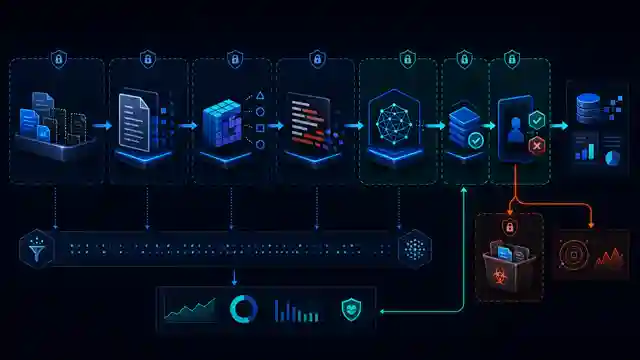
A responsible AI document workflow should help staff prepare work without giving a model silent authority to approve, send, delete or commit on behalf of the business. Before rollout, define which documents may enter the workflow, what information must be removed, who reviews the output and what evidence is kept. This is operational guidance for Singapore SMEs, not legal advice.
What counts as an AI document workflow?
The term covers more than a chatbot. A workflow may collect a file from email or a folder, extract text, classify the document, ask a model for a summary or structured fields, route the result to a reviewer and then write an approved result into another system.
The risk changes at every boundary. Reading a synthetic policy for a pilot is different from processing live customer records. Drafting a summary is different from sending it. Treat each step as a separate decision.
1. Name the business decision and owner
Write one sentence describing the job. Examples include “prepare a draft meeting summary for the project owner” or “extract invoice fields for finance review”. Avoid broad goals such as “automate documents”.
Name a business owner for the decision, a technical owner for the workflow and a reviewer for exceptions. The owner should be able to pause the workflow and decide whether a change is acceptable.
2. Classify documents before choosing a tool
List the document types and information they can contain. Separate public or synthetic material, ordinary internal information, confidential business material, personal data, financial details, credentials and regulated or legally sensitive records according to the organisation’s own policy.
Do not use a consumer tool by habit and then discover that real records were pasted into it. Check the provider terms, account type, retention settings, administrative controls and data handling before live use. Escalate legal or PDPA questions to qualified human advisers.
3. Set an allowed-data boundary
Define what the model may receive. Remove fields the task does not need. A workflow producing a document category may not need a person’s full address, bank details or the entire email thread.
OWASP’s guidance on sensitive information disclosure recommends controls such as sanitisation, input validation, strict access control and restricted data sources. These controls support a practical rule: minimise data before it reaches the model, rather than hoping a prompt will keep it safe.
4. Separate source documents from model output
Store the original document under the normal business access policy. Keep the model’s draft as a separate version with its workflow reference, time, model or service version and reviewer state.
Do not overwrite the source. A reviewer should be able to compare a summary, classification or extracted field with the underlying page or section.
5. Decide what AI may draft and what it may never do alone
Low-impact assistance may include drafting a summary, proposing categories, extracting candidate fields or pointing a reviewer to possible exceptions. Actions that create commitments, change access, release confidential material, delete records or send an external response need an explicit business rule and human approval.
OWASP describes excessive agency as a combination of excessive functionality, permissions or autonomy. Keep the model’s tools and downstream permissions to the minimum needed. If the workflow only drafts, it should not also hold permission to send or delete.
6. Make approval a real control
Place approval after the final draft and before the side effect. Show the reviewer the source reference, proposed output, missing fields, confidence or validation warnings and intended destination. Give clear choices: approve, reject, correct or escalate.
Bind the approval to a fixed version. If the draft changes after approval, require a new decision. Record the reviewer, time and outcome without copying unnecessary document content into the audit log.
7. Define source-checking rules
A fluent answer can still be wrong. For summaries and extracted fields, require the workflow to retain page, paragraph or record references where the format supports them. Reviewers should check names, dates, amounts, obligations and exceptions against the source.
For drafting tasks, distinguish supplied facts from model suggestions. Do not let the workflow invent a customer, transaction, policy or case to fill a gap.
8. Control access at every system
Map who can read the source, run the workflow, view execution data, change prompts, alter credentials, approve output and write to the destination. Use separate service identities and narrow permissions where the platform supports them.
Changing a prompt or extraction schema can change business output. Treat those changes as controlled configuration, not casual text editing.
9. Keep secrets out of prompts and logs
Store API keys and passwords in the platform’s credential store or an approved secrets manager. Do not paste them into prompts, code nodes, screenshots or exported workflow files.
Review success and failure logs. Error paths often capture more raw content than the normal path. Set retention deliberately and restrict access to execution data.
10. Test with representative but safe records
Begin with synthetic documents that cover normal and awkward formats. Test scanned pages, missing fields, handwritten notes, tables, duplicate uploads, conflicting values, password-protected files, unsupported types and an unavailable model service.
Measure whether the workflow routes uncertainty to a person. A pilot that only tests clean documents will teach little about production behaviour.
11. Monitor business exceptions, not only uptime
Useful measures include rejected outputs, corrections by field, documents sent to manual review, duplicate suppression, approvals waiting too long, failed writes, model or parser changes and unexplained drops in volume.
Give each alert an owner and response step. A dashboard that nobody checks is not a control.
12. Prepare rollback and manual work
Keep a reviewed previous workflow version and document how to disable model calls without losing incoming documents. The manual fallback should preserve ownership, references and reconciliation.
After rollback, check whether any document was partly processed, written twice or left in an approval queue. Technical recovery does not finish until operational state is reconciled.
Responsible AI document workflow checklist
- The business decision, owner and reviewer are named.
- Document types and data classes are listed.
- Only permitted minimum data reaches the model.
- Source documents remain separate from AI drafts.
- The model has no unnecessary tools or permissions.
- Approval is bound to a fixed output version.
- Important fields are checked against sources.
- Access, prompts and credentials have owners.
- Logs avoid secrets and unnecessary content.
- Failure cases are tested with safe records.
- Exceptions and corrections are monitored.
- Rollback and manual reconciliation are documented.
A practical starting point
NIST’s AI Risk Management Framework is intended for voluntary use and frames AI risk work around governance, mapping, measurement and management. SMEs do not need a large programme to apply that thinking. Start with one bounded workflow, record the decision and data path, test the weak cases and keep a person responsible for the output.
Sakal Network’s AI process automation service covers document workflows using n8n, Microsoft tools and Claude. The n8n Starter Kit on Sakal Shop can support a controlled pilot where the use case fits. To review a specific workflow and its data boundaries, contact Sakal Network.